
 I’m sure it has happened to you too. You look someone up on LinkedIn only to find they are a third degree connection (or not even!) and you get a profile page with basically no information.
LinkedIn profile access is even more restricted, today you now need a premium account to view third degree connections.
Of course, you can solve this with a premium membership, but here is how to view the full public profile without a premium account.
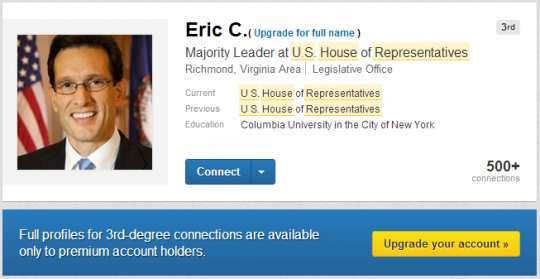
Here is an example using Eric Cantor, a Congressman from Virginia that I don’t share any groups with and isn’t a connection. Searching in LinkedIn, this is all I was able to see of his profile:
1. Search On Google
Don’t start with LinkedIn. Instead, use Google and include LinkedIn in your search (or even start the search with site:linkedin.com to limit your results to just LinkedIn).
You are looking for a search result that goes directly to the individual, not a LinkedIn search results page. Here is what it should look like. Notice the title and location indicate it’s a result for an individual profile.

Particularly if its a common name, adding a title, company, location or other info to your search will help to narrow the results and find the right person. In this case, I searched for site:Linkedin.com Eric Cantor Majority Leader.
2. View the Cached Profile
Mouse over the search result, you will get a chevron to the right of the result. Mouse over the chevron and you will see a preview of the page and a link to view the cached version of the page.
The cached page is your ticket. This is the profile Google sees and indexes.
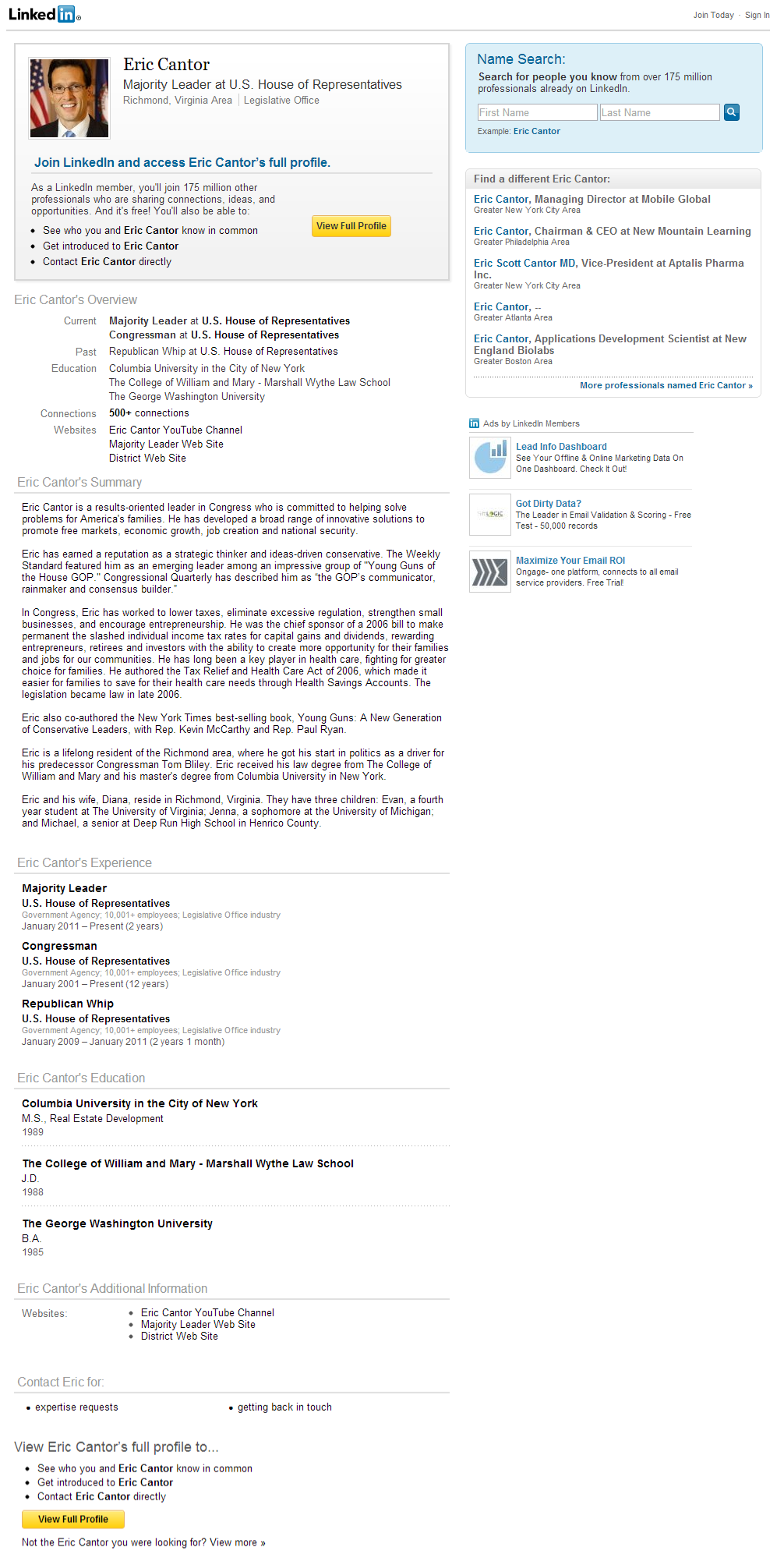
Click to view the cached version, and viola, you will see the full public profile. Here is Eric Cantor’s full public profile (click to see it full size).
If you are identifying contacts, researching prospects or just spying on a competitor, now you can access any profile on LinkedIn.
Troubleshooting
If you cannot easily find the profile using Google, view Google’s cached version of one of the LinkedIn search results pages. You will get the full name, headline, title and both current and past companies. Add the title or headline to your search and you will get directly to the right person.
For Eric Cantor again, here is the cached search results page, showing significantly more information than the typical LinkedIn search results page offers.
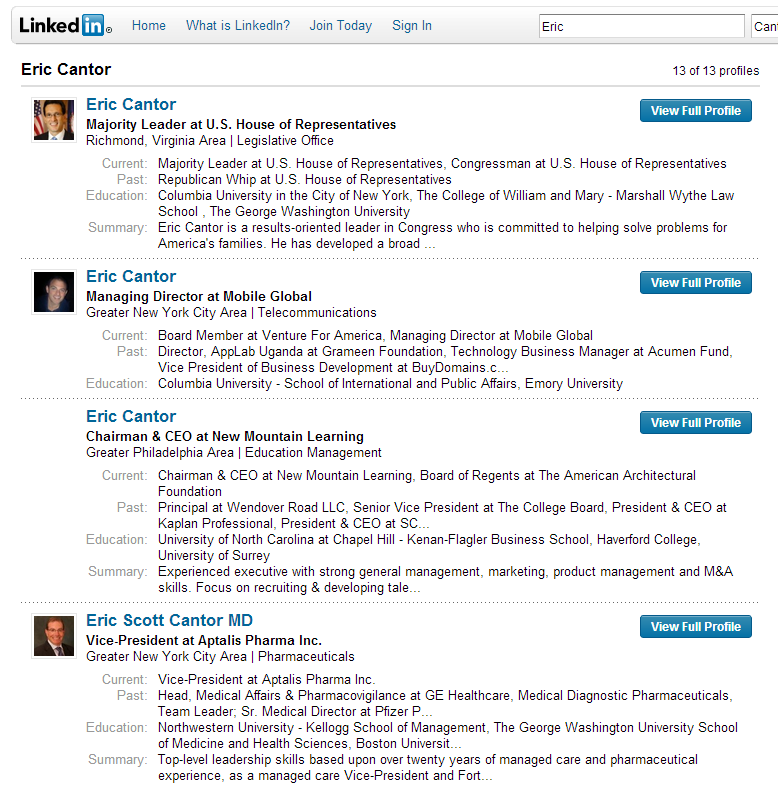
Similarly, if you are searching for a contact by title at a company, start by searching for the company plus title on Google and limiting your results just to LinkedIn. By viewing the cached results, you can identify the person and get their full name, even if you are not connected to them at all.
Update: It appears the cached version is no longer available in Google search for some users. If your browser has an incognito or private browser option (Chrome does), you can simply open the Google search result in an incognito window to get the full public profile.
Your Turn
Do you have favorite LinkedIn tricks you have discovered? If so, please share them in the comments below or with me on Twitter (@wittlake)!

Pingback: Sourcing3 Buyer & Supplier Magazine - Best of B2B Marketing Zone for Week of December 15, 2012()
Pingback: Sourcing3 Buyer & Supplier Magazine - Best of B2B Marketing Zone for December, 2012()
Pingback: marketing.com.gr » Which social media platform is best for your business?()
Pingback: which social media platform is best for your business? | ask j how | a web design and branding studio in frederick, maryland()
Pingback: Which social media platform is best for your business?SOVIDERS TECH | SOVIDERS TECH()
Pingback: Which social media platform is best for your business? |()
Pingback: The Best Social Media Platforms for Your Business | Social Media Strategy Plan()
Pingback: Which social media platform is best for your business? | Blog actuales.es()
Pingback: Which social media platform is best for your business?()
Pingback: Which social media platform is best for your business? • WordPress Savvy | WordPress Savvy()
Pingback: Social Media: Which One is Best for Your Business? - SEOCrawler Blog | SEOCrawler Blog()
Pingback: ecommerceweb.nl – Which social media platform is best for your business?()
Pingback: Politics & P2P | Nominet and the Cult of Contradiction and Commercialism()
Pingback: horror Movie()
Pingback: Free CD Ripper()
Pingback: led road light()
Pingback: Convertible car seat()
Pingback: ξυνη()
Pingback: Which social media platform is best for your business? - DAH Solutions()
Pingback: top blender()
Pingback: Social Media | paulien @ haaga-helia UAS()
Pingback: como ganhar renda extra()
Pingback: commercial cleaning ct()
Pingback: belangerfinancial.com()
Pingback: pressure washing()
Pingback: http://bjcssc.com/comment/html/index.php?page=1&id=58006()
Pingback: http://Www.Yjswj.com()
Pingback: sell()
Pingback: demo.truck2.vps-private.net()
Pingback: pressure cleaning()
Pingback: Rocky Hill Pressure Cleaning CT()
Pingback: over here()
Pingback: Barron & Jacobs()
Pingback: www.yelp.com()
Pingback: nashville rap()
Pingback: www.tunafood.nl()
Pingback: Rankings()
Pingback: mixtapes still Includes()
Pingback: Adidas NMD Women()
Pingback: Adidas Ultra Boost 2017 Men()
Pingback: Alex Smith Jerseys()
Pingback: Gay()
Pingback: Washington()
Pingback: Milwaukee()
Pingback: west virginia()
Pingback: Idaho()
Pingback: Which social media platform is best for your business? – The Top Secretes and Methods, on How to Make Money Online at the corner of your home()
Pingback: book essays()
Pingback: download books online children()
Pingback: rake on poker sites()
Pingback: 7()
Pingback: /2012/12/20/view-linkedin-profile/trackback/()
Pingback: download()